
HubCoach help center: guides to use HubCoach inside HubSpot
Here you will find how to use HubCoach, a Revenue Hub Latam product: the Chrome extension and web app that bring your team’s criteria to the HubSpot record. There are articles for administrators who connect the portal and create rules, processes and content; for leaders who assign plans and measure reading; and for reps and agents who work through the day’s notices. Each article has steps, an example and what to keep in mind.
- 38 articles
- Spanish and English
- Updated October 4, 2026
- 1Install, connect and update the Chrome extension
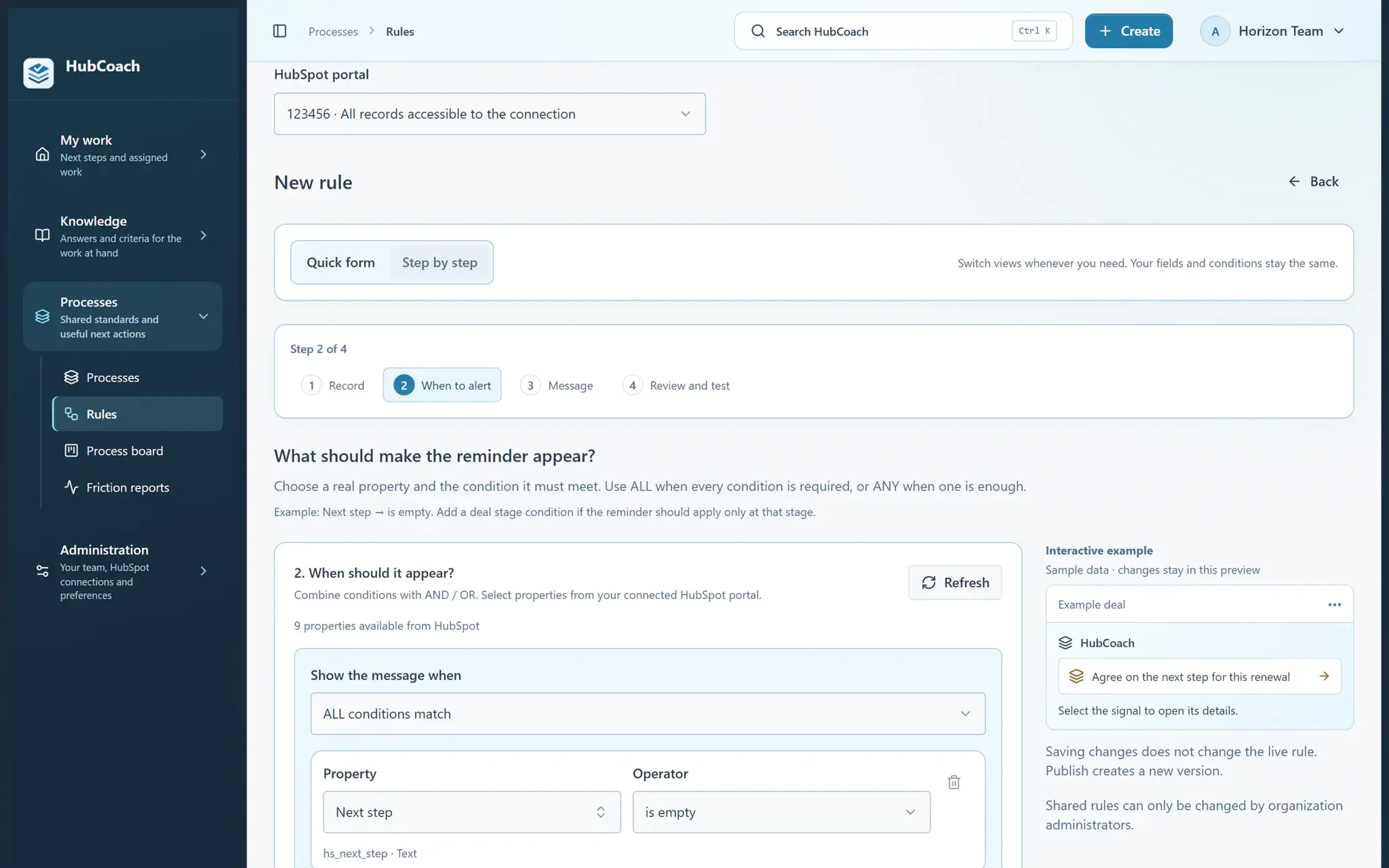
- 2Create your first useful rule
- 3Work through the records that need attention
Which articles do you need for your role?
Articles are grouped by who uses them. Start with yours and follow the links in each one.

 RevOps and administrators
Create and publish
Rules, processes, knowledge and guided tours for your team.
13 articles
 Leaders and administrators
Team and permissions
Connection, access, announcements and reading analytics.
7 articles- The whole team
If something is missing
Notices, articles and images that do not show where you expected.
3 articles
Where do I start with HubCoach?
Install the extension, create the first rule and choose what to create.
- Getting started
Pick up where you left off
Start the day with your next steps, recent knowledge and team updates.
2 min readRead the article - Getting started
Create your first useful rule
Start with a missing next step and see exactly what a teammate will receive.
2 min readRead the article - Getting started
Install, connect and update the Chrome extension
Get help into your HubSpot records and keep the installed version current.
2 min readRead the article - Getting started
Rule, process, article or action plan: which should I create?
Choose by the job you want to help someone do.
2 min readRead the article
How do I use HubCoach in my daily work?
Notices, plans, tours and articles inside the record you are working on.
- Daily work in HubSpot
Work through the records that need attention
Turn a warning into a clear next action while staying in HubSpot.
2 min readRead the article - Daily work in HubSpot
Assign and complete a concrete action plan
Give a person a clear outcome, steps and a target date.
2 min readRead the article - Daily work in HubSpot
Continue a plan from the record you are working on
Find your assigned next step alongside the deal, contact, company or ticket.
2 min readRead the article - Daily work in HubSpot
Understand a red close date
An open deal with a past close date needs an updated forecast.
2 min readRead the article - Daily work in HubSpot
Set up useful reminders for Marketing
Help people prepare contacts and handoffs using the data your portal actually has.
2 min readRead the article - Daily work in HubSpot
Set up useful reminders for Customer Service
Guide ticket classification, follow-up, escalation and resolution.
2 min readRead the article - Daily work in HubSpot
Save a board for your daily review
Return to the same portal, record type and rule selection without setting them up again.
2 min readRead the article - Daily work in HubSpot
Correct, postpone or report a signal
Choose the response that reflects what actually happened.
2 min readRead the article - Daily work in HubSpot
Filter, edit and review an existing action plan
Find assigned work and improve its instructions without recreating the plan.
2 min readRead the article - Daily work in HubSpot
Find a useful article while working on a ticket
See suggested guidance without leaving the ticket you are reviewing.
2 min readRead the article - Daily work in HubSpot
Follow a guided tour inside HubSpot
Let HubCoach point at each control while you do the work yourself.
2 min readRead the article
How do I manage the team, permissions and measuring?
HubSpot connection, access, announcements, analytics and automatic signals.
- Team, permissions and measuring
Share an update and confirm you have read it
Deliver a short team update at the right time and place.
2 min readRead the article - Team, permissions and measuring
See whether your guidance is being used
Use recorded reading activity to improve the material your team receives.
2 min readRead the article - Team, permissions and measuring
Choose how your team sees the help
Understand what an option changes before switching it on or off.
2 min readRead the article - Team, permissions and measuring
Connect the right account and give the team access
Check what the connection can read and who can use it.
2 min readRead the article - Team, permissions and measuring
Understand reading, writing and field definitions
Check what an integration can do before troubleshooting a rule.
2 min readRead the article - Team, permissions and measuring
Why can one person see content while another cannot?
Review publication and access in the right order.
2 min readRead the article - Team, permissions and measuring
Manage automatic signals in HubSpot
Enable the rulebook by category, for the organization or a connected portal.
2 min readRead the article
What do I do if something does not appear?
Quick checks when a notice, an article or an image is missing.
- If something is missing
Find help when something does not appear
A few quick checks can explain why a warning or article is missing.
2 min readRead the article - If something is missing
Use HubCoach in Classic and the new record experience
Find the blue strip and native editing actions in either HubSpot layout.
2 min readRead the article - If something is missing
Add images, GIFs, videos and expandable details
Keep the main instruction short and make examples easy to inspect.
2 min readRead the article
What else might help?
Can’t find what you are looking for?
If you already use HubCoach, report what is not working in Friction reports, inside the app, so whoever maintains your rules and content can review it. If you do not use it yet, apply to the waitlist.
You can also write to us at contacto@revenuehublatam.com.
Already have an account? Sign in

A Revenue Hub Latam product
HubSpot Platinum Partner in Santiago, ChileHubCoach is a Revenue Hub Latam product, born from what we solve with sales and service teams in HubSpot.