

Help center · Daily work in HubSpot

How do I assign and complete an action plan in HubCoach?

Give a person a clear outcome, steps and a target date. A plan fits when a person needs concrete steps, not just a reminder.

  • For leaders and administrators
  • 2 min read
  • Updated October 4, 2026
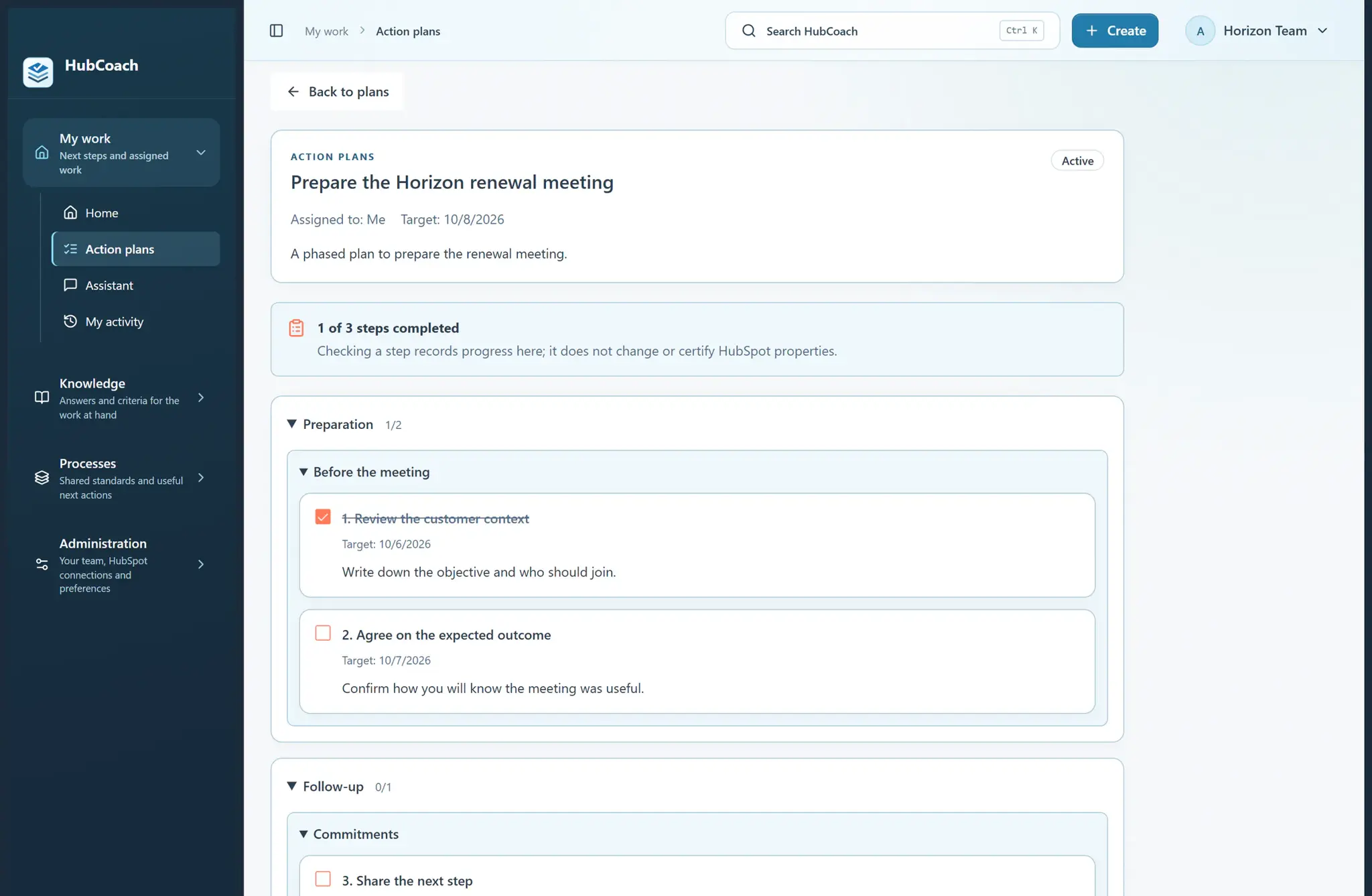
A phased action plan in the HubCoach web app: one of three steps done, with target dates and a note that checking a step does not change HubSpot
Daily work in HubSpotAt a glance
Where
Web app · Action plans
For
For leaders and administrators
Steps
5 steps
Time
2 min
A phased action plan, with sample data.

What are the steps?

  1. Use Create → An action plan in the top bar, or open My work → Action plans and select New action plan. Choose Guided or Quick.
  2. Name the outcome. Write your own steps or start from a published checklist; each plan keeps its own copy.
  3. Add short instructions. For longer work, organize steps into phases or sections and add useful dates or links.
  4. Assign it to yourself, or to an enabled teammate if you are an administrator. Add a target date and optionally link a HubSpot record.
  5. Review and create the plan. Its assignee can complete or uncheck steps in the web app or the extension’s Plans tab.

What does it look like in practice?

  • Example

    “Prepare Acme’s renewal” → review usage → confirm a meeting → send the proposal. Assign it to the account owner.

What should you keep in mind?

What does a good action plan look like?

  • Good

    Prepare the Horizonte renewal meeting. Review last quarter’s usage, confirm who decides and send the proposal before Thursday.

  • Could be better

    Improve the account. No steps, no date and no outcome anyone can review.

Frequently asked questions

What else do people ask?

Does checking a plan step change HubSpot?

No. Checking a step saves the plan’s progress, but it does not change the record or prove that the meeting or the change happened.

Keep learning

What else might help?

More help articlesFrom Revenue Hub Latam
Need help?

Need help with HubCoach?

If you already use HubCoach, report what is not working in Friction reports, inside the app, so whoever maintains your rules and content can review it. If you do not use it yet, apply to the waitlist.

You can also write to us at contacto@revenuehublatam.com.

HubSpot Solutions Partner Platinum

A Revenue Hub Latam product

HubSpot Platinum Partner in Santiago, ChileHubCoach is a Revenue Hub Latam product, born from what we solve with sales and service teams in HubSpot.
HubSpot Partner Summit LATAM 2026From the Revenue Hub Latam team that created PortalSync: most-voted pitch, Pitch Contest · HubSpot Partner Summit LATAM 2026, Bogotá.
Meet Revenue Hub Latam
Action plans in HubCoach | HubCoach for HubSpot