

Help center · Team, permissions and measuring

How do I see whether my HubCoach guides are being used?

Use recorded reading activity to improve the material your team receives. Reading is not mastering: these numbers help you improve the material.

  • For administrators and leaders
  • 2 min read
  • Updated October 4, 2026
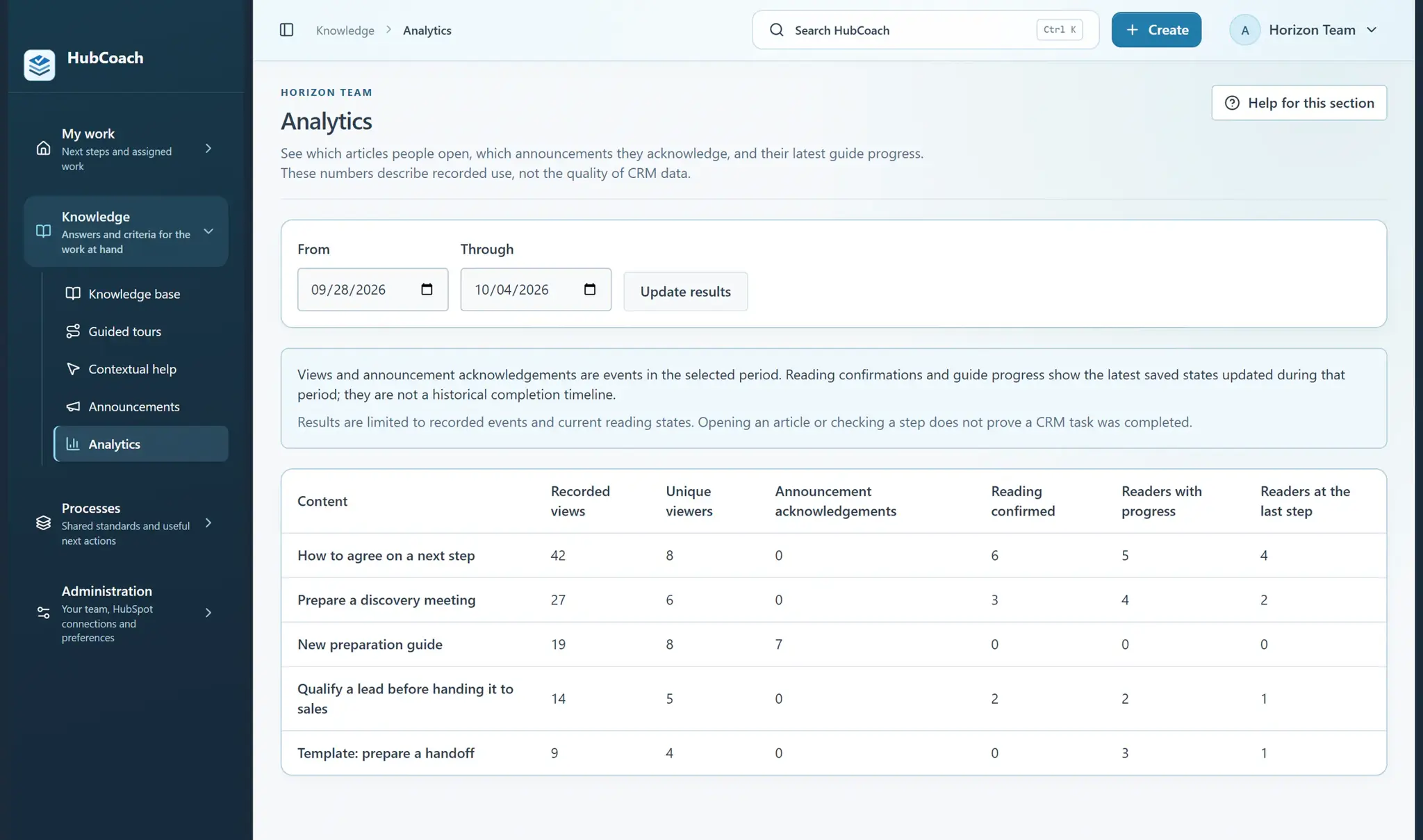
Content analytics for the last 7 days: the five most viewed articles, with unique viewers, reading confirmations and progress
Team, permissions and measuringAt a glance
Where
Web app · Analytics
For
For administrators and leaders
Steps
4 steps
Time
2 min
Most read in the last 7 days, with sample data.

What are the steps?

  1. As an administrator, open Content analytics and choose a date range.
  2. Compare recorded views, different readers and announcement confirmations.
  3. Review saved guide progress to spot material that people start but may need help finishing.
  4. Use what you learn to shorten an article, improve its example or ask the team what was unclear.

What does it look like in practice?

  • Example

    A guide receives many views but few readers reach its last step. Ask whether the instructions need a clearer example.

What should you keep in mind?

Keep learning

What else might help?

More help articlesFrom Revenue Hub Latam
Need help?

Need help with HubCoach?

If you already use HubCoach, report what is not working in Friction reports, inside the app, so whoever maintains your rules and content can review it. If you do not use it yet, apply to the waitlist.

You can also write to us at contacto@revenuehublatam.com.

HubSpot Solutions Partner Platinum

A Revenue Hub Latam product

HubSpot Platinum Partner in Santiago, ChileHubCoach is a Revenue Hub Latam product, born from what we solve with sales and service teams in HubSpot.
HubSpot Partner Summit LATAM 2026From the Revenue Hub Latam team that created PortalSync: most-voted pitch, Pitch Contest · HubSpot Partner Summit LATAM 2026, Bogotá.
Meet Revenue Hub Latam
Reading analytics in HubCoach | HubCoach for HubSpot