

Practical guide · Sales follow-up

How do you define the next step in HubSpot? A guide for teams in Chile and Latin America

A useful next step in HubSpot says which action comes next, who does it and when or under what condition, so another person can continue the deal without asking. Record it in the deal’s Next step property, add a task or meeting with its date and review its quality with your team: a filled field does not guarantee a useful step.

  • 6 min read
  • Updated October 4, 2026
  • With examples
A HubSpot deal record with the HubCoach signal strip showing three signals to review, and the Side Panel open on the overdue close date and the missing next step
Next step in HubSpotAt a glance
Formula
Action, owner, date and what the customer agreed
Where
The deal’s Next step property
When
After every conversation that changes the plan
Review
A sample every week, not just empty fields
HubCoach signals on a deal record, with sample data.

What is the next step of a deal in HubSpot?

Next step is a default HubSpot deal property. HubSpot describes it as the next steps you or another user will take to improve the likelihood of closing the deal. It also appears as Next step in the forecast tool.

It is free text: HubSpot does not check whether what you write is clear, agreed with the customer or still current. It is also not the same as Next activity date.

Next step and Next activity date in HubSpot
PropertyWhat it saysWho fills it in
Next stepWhat comes next, in free textThe deal owner
Next activity dateWhen the next task or meeting isHubSpot, from the scheduled activity

A deal can have a date and no useful explanation, or a clear explanation and no scheduled activity. Your team decides which of the two it reviews and when it expects both.

What does a useful next step look like?

Use a simple formula: action, owner, date or condition, and what the customer agreed. “Follow up” or “Waiting for an answer” fills the field but tells a colleague nothing. These examples, from B2B sales in Chile and Latin America, show the difference.

  • Instead of

    “Follow up”.

  • Write

    “Send the revised proposal on Thursday and confirm with the operations manager whether it goes to Monday’s committee”.

  • Instead of

    “Call”.

  • Write

    “Call the purchasing lead on Tuesday to confirm whether the budget was approved; if there is no answer, write to the general manager on Wednesday”.

  • Instead of

    “Waiting for an answer”.

  • Write

    “The customer asked for two weeks to review with their board; contact them again on the 24th with the plan comparison they requested”.

Where and when should you record it in HubSpot?

  1. Open the dealGo to CRM > Deals and open the record.
  2. Update Next stepAfter each conversation that changes the plan, not only before the pipeline meeting.
  3. Keep it in sightIf your team uses it every day, ask your administrator to show it in the record’s sidebar.
  4. Schedule the task or meetingWith its date and associated with the deal. It is then reflected in Next activity date and appears in the owner’s task list.

In the forecast tool (Sales > Forecast) the same field appears as Next step, so a manager can read it while reviewing the forecast.

How do you review next steps in the pipeline meeting?

In CRM > Deals, open Advanced filters and use Add filter to build a view of open deals with no Next step, and another with Next activity date in the past or empty. Save the views so the team reviews the same list every week.

Do not stop at counting empty fields. Take a few deals and ask the owner to read the next step out loud.

  • Could someone else continue with it? If not, the action or the owner is missing.
  • Was it agreed with the customer? An agreed step and a proposed one are not the same for the forecast.
  • Is the date realistic? A date that moves every week is a reason to talk.

Record the exceptions, such as deals waiting for a public tender in Chile or elsewhere in Latin America, so they are not flagged every week. The guide to pipeline stages in HubSpot helps define what is expected at each stage.

What can HubCoach do with the next step?

HubCoach, a Revenue Hub Latam product, can show a notice when a deal in the stages you choose has an empty Next step. The notice brings your team’s criterion, a good example and an exception, in the Side Panel next to the record.
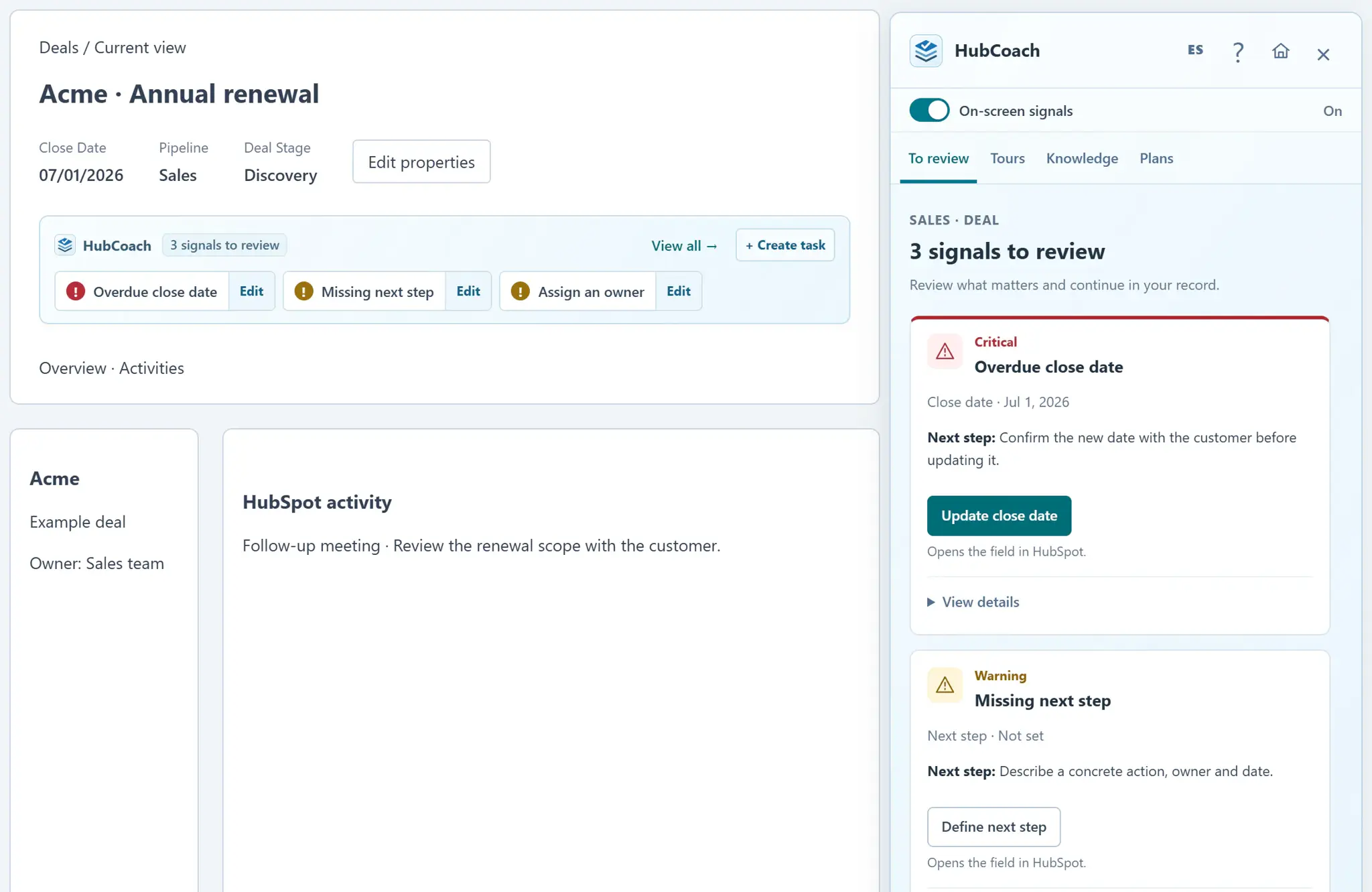
A HubSpot deal record with the HubCoach signal strip showing three signals to review, and the Side Panel open on the overdue close date and the missing next step
HubCoach signals on a deal record, with sample data.

The Clear next step process template and the coaching card “A next step someone else can continue” are a starting point you adapt. To set it up, follow Create your first useful rule.
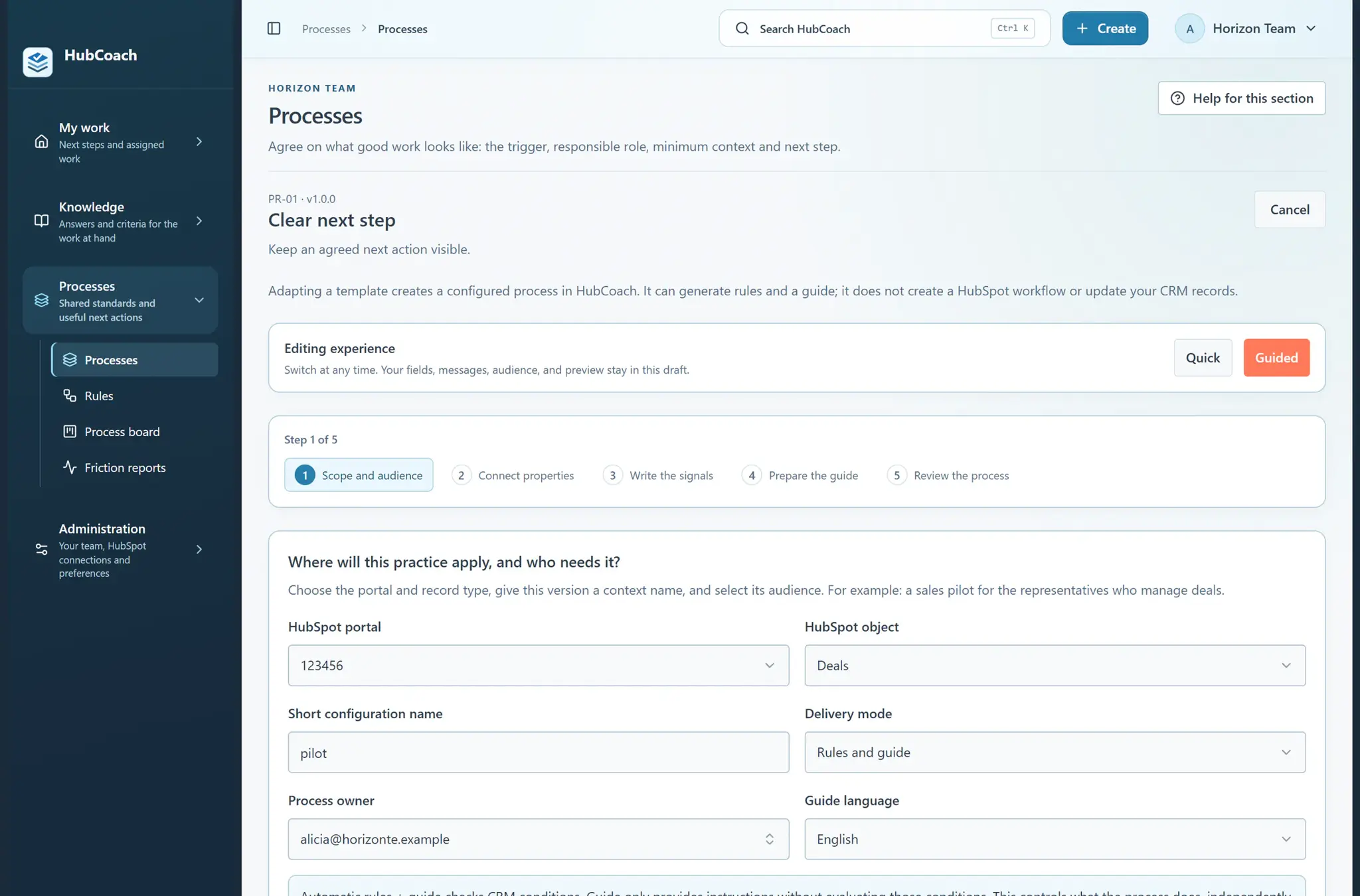
The Clear next step process template in guided mode: five steps, from scope and audience to reviewing the process, without creating HubSpot workflows
A process template ready to adapt, with sample data.

What should you review this week?

  • Agree on the formula: action, owner, date or condition and what the customer agreed.
  • Record Next step after every conversation that changes the plan.
  • Create the task or meeting with its date, associated with the deal.
  • Save a view of open deals without a next step and review it every week.
  • Review the quality of a few steps with their owners, not only empty fields.
Frequently asked questions

What else do teams ask about the next step in HubSpot?

Is Next step a required property in HubSpot?

Not by default. An administrator can make properties required in certain stages, but a required field does not make the text useful. Agree on the criterion first and review a sample of real deals.

What is the difference between Next step and Next activity date?

Next step is free text that explains what comes next. Next activity date is filled by HubSpot from the next activity scheduled for the deal. Review both: one explains, the other shows that something is on the calendar.

Should a next step always have a date?

It should have a date or a clear condition, such as “when the board approves the budget”. If the customer has not agreed on anything, record what is missing to agree on it instead of inventing a date.

Can HubCoach fill in the next step automatically?

No. HubCoach shows the criterion, an example and the native action next to the record. The person writes, reviews and saves the change in HubSpot.

Who should review next steps?

The deal owner updates them, and the sales manager reviews a sample with the team in the weekly meeting. RevOps or the CRM administrator maintains the views, rules and examples.

Where can I see deals without a next step in HubSpot?

In CRM > Deals, create a saved view with Advanced filters > Add filter: Next step with no value, limited to the open stages your team reviews. Save it and use it in the weekly meeting.

Does the same formula work if the team sells in several countries?

Yes. Action, owner, date and what was agreed work the same for a team in Chile as for one that sells across several Latin American countries. Write the step in the language of whoever will continue it.

A Revenue Hub Latam product

Who is behind HubCoach?

HubCoach is a Revenue Hub Latam product. It grew out of what we solve when we implement and run HubSpot with sales and service teams in Chile and Latin America.

  • Criteria that fade after the training ends.
  • Next steps nobody else can pick up.
  • Handoffs that make the customer repeat their story.
HubSpot Solutions Partner Platinum
HubSpot Platinum Partner in Santiago, ChileWe implement, rescue and run HubSpot for B2B companies.
HubSpot Partner Summit LATAM 2026From the Revenue Hub Latam team that created PortalSync: most-voted pitch, Pitch Contest · HubSpot Partner Summit LATAM 2026, Bogotá.
Waitlist

Want HubCoach to bring this to every record?

HubCoach shows your team’s criteria next to the HubSpot record where the decision happens, in Spanish or English, for teams in Chile and Latin America.

  1. You apply with your work email and how many people would use it.
  2. We review the list every 15 days and write to you when there is a seat.
  3. You start with a small group and one concrete process.
Next step in HubSpot: how to define it | Revenue Hub Latam