

Help center · If something is missing

How do I use HubCoach in Classic and in HubSpot’s new record experience?

Find the blue strip and native editing actions in either HubSpot layout. You do not need to force a layout: HubCoach looks for the editor in the one you have open.

  • For the whole team
  • 2 min read
  • Updated October 4, 2026
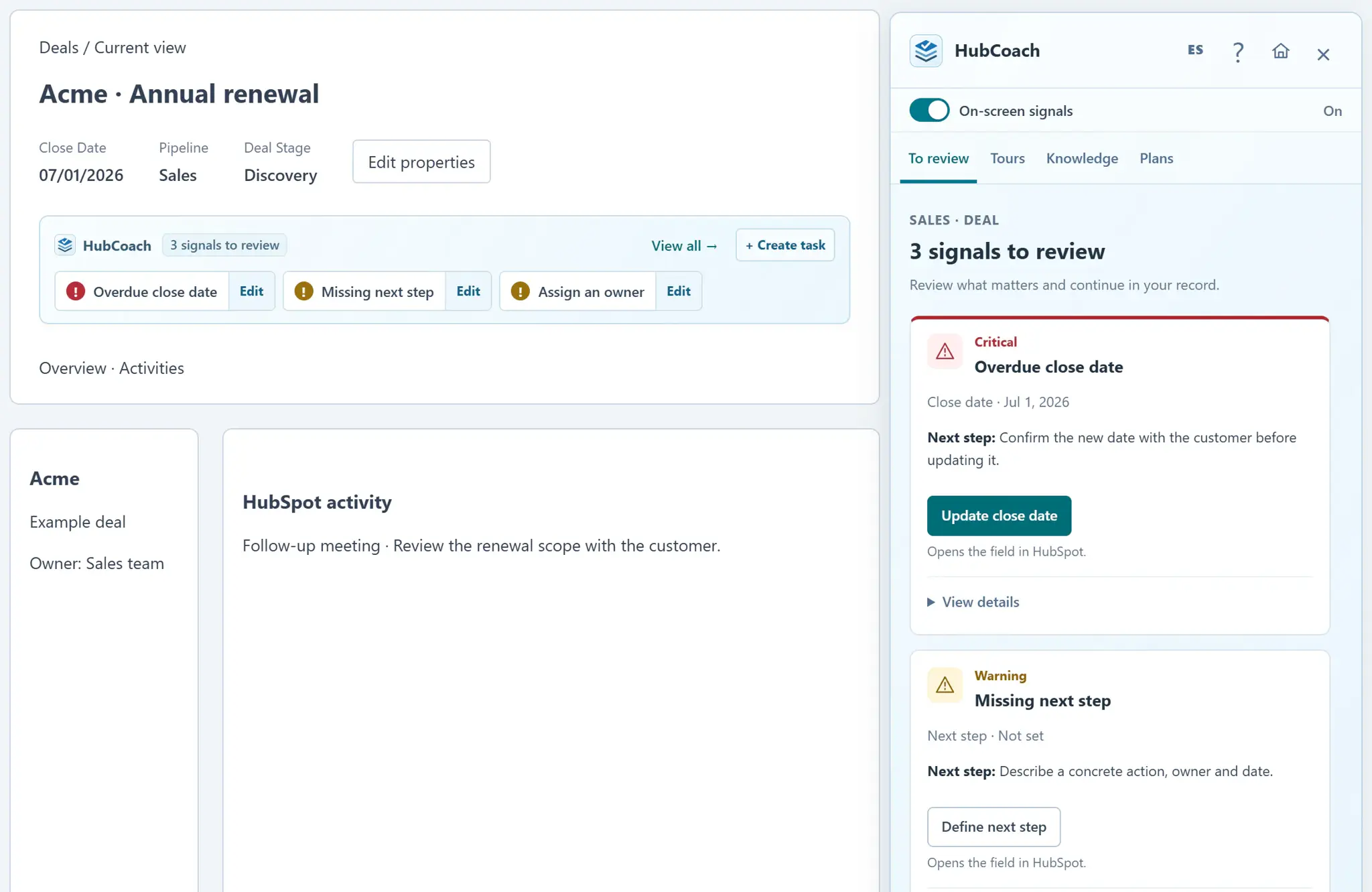
A HubSpot deal record with the HubCoach signal strip showing three signals to review, and the Side Panel open on the overdue close date and the missing next step
If something is missingAt a glance
Where
Inside HubSpot
For
For the whole team
Steps
5 steps
Time
2 min
HubCoach signals on a deal record, with sample data.

What are the steps?

  1. Open an individual contact, company, deal or ticket in HubSpot.
  2. The “View classic experience” control identifies the new layout. Classic URLs may contain viewClassic=true.
  3. Look for the compact blue signal strip near the record’s main working area. The electric-blue edge tab opens the Side Panel and counts active alerts on this record. Drag it along either edge or use Alt + arrow keys when focused.
  4. Select the action inside a signal. HubCoach looks for the editor in the current layout, including All properties when needed. When there is enough screen width and both panels are open, All properties sits immediately to the left of the Side Panel so you can read a field and its guidance together.
  5. After switching records or layouts, allow the new record’s signals to load. If the extension is outdated, reload it and refresh HubSpot.

What does it look like in practice?

  • Example

    The same overdue deal can show a notice in both layouts; you do not need to force Classic.

What should you keep in mind?

Keep learning

What else might help?

More help articlesFrom Revenue Hub Latam
Need help?

Need help with HubCoach?

If you already use HubCoach, report what is not working in Friction reports, inside the app, so whoever maintains your rules and content can review it. If you do not use it yet, apply to the waitlist.

You can also write to us at contacto@revenuehublatam.com.

HubSpot Solutions Partner Platinum

A Revenue Hub Latam product

HubSpot Platinum Partner in Santiago, ChileHubCoach is a Revenue Hub Latam product, born from what we solve with sales and service teams in HubSpot.
HubSpot Partner Summit LATAM 2026From the Revenue Hub Latam team that created PortalSync: most-voted pitch, Pitch Contest · HubSpot Partner Summit LATAM 2026, Bogotá.
Meet Revenue Hub Latam
HubCoach in Classic and the new UI | HubCoach for HubSpot