

Help center · Daily work in HubSpot

How do I follow a HubCoach guided tour inside HubSpot?

Let HubCoach point at each control while you do the work yourself. A tour shows you the way on your own screen: whatever you do in HubSpot, you save it.

  • For new hires and the whole team
  • 2 min read
  • Updated October 4, 2026
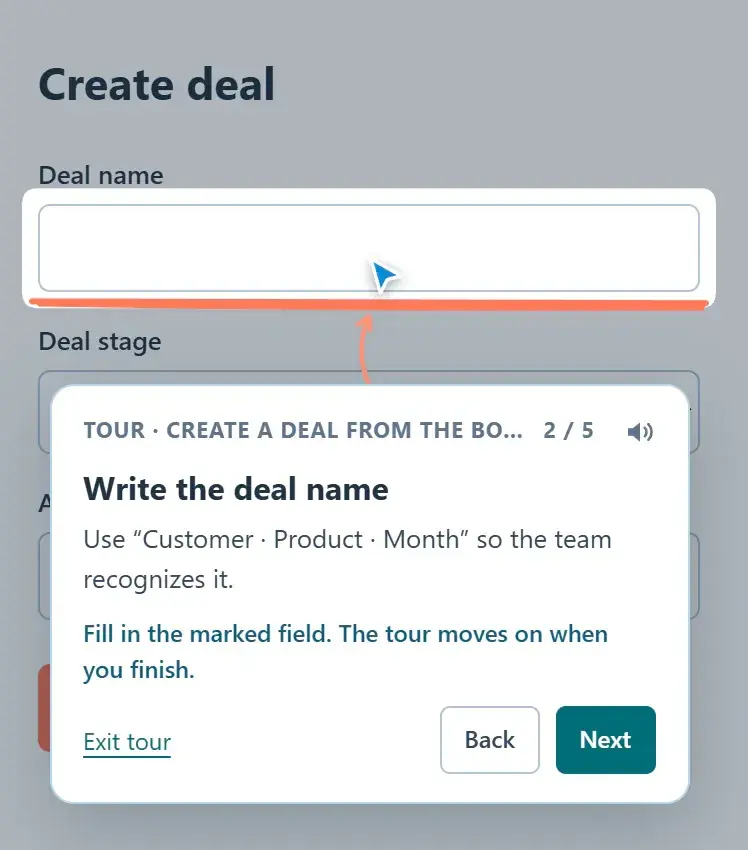
Guided tour at step 2 of 5: the balloon asks for the deal name and highlights the field in the create form
Daily work in HubSpotAt a glance
Where
Side Panel in HubSpot
For
For new hires and the whole team
Steps
6 steps
Time
2 min
A step-by-step guided tour, with sample data.

What are the steps?

  1. Open HubSpot, open the Side Panel and choose Tours.
  2. With the search empty, the most-started tours of the last 7 days appear first automatically. Or ask what you want to do, such as “how do I create a deal”. Search keeps its relevance order.
  3. Choose Start tour. HubCoach automatically opens its starting view and continues at the first step after the page loads. When a tour needs a specific record, open an appropriate record first: tours never store someone else’s record ID. A cursor points at the control and a note explains the step.
  4. Do the action in HubSpot: click the marked control or fill in the field. The tour moves on by itself. You can also choose Next or Back.
  5. When a step happens in another view, open it or choose Go to that view. The tour continues there, even after HubSpot loads another page.
  6. Choose Exit tour at any time. You can repeat a tour whenever you need it.

What does it look like in practice?

  • Example

    You need to log a call outcome and do not remember where. Type “call outcome” in Tours, start the tour and follow the marked steps on your own record.

What should you keep in mind?

How do you find the tour you need?

  • Search like this

    “how do I log a call”, “create deal from contact”, “close ticket”.

  • Avoid

    A single word such as “deal”: it brings too many results.

Frequently asked questions

What else do people ask?

Can I leave a tour halfway?

Yes. Choose Leave tour whenever you want and repeat it when you need it. What you already did in HubSpot stays as you saved it.

Keep learning

What else might help?

More help articlesFrom Revenue Hub Latam
Need help?

Need help with HubCoach?

If you already use HubCoach, report what is not working in Friction reports, inside the app, so whoever maintains your rules and content can review it. If you do not use it yet, apply to the waitlist.

You can also write to us at contacto@revenuehublatam.com.

HubSpot Solutions Partner Platinum

A Revenue Hub Latam product

HubSpot Platinum Partner in Santiago, ChileHubCoach is a Revenue Hub Latam product, born from what we solve with sales and service teams in HubSpot.
HubSpot Partner Summit LATAM 2026From the Revenue Hub Latam team that created PortalSync: most-voted pitch, Pitch Contest · HubSpot Partner Summit LATAM 2026, Bogotá.
Meet Revenue Hub Latam
Follow a guided tour in HubSpot | HubCoach for HubSpot