Use case · Guided tours

HubCoach guided tours inside HubSpot for teams in Chile and Latin America

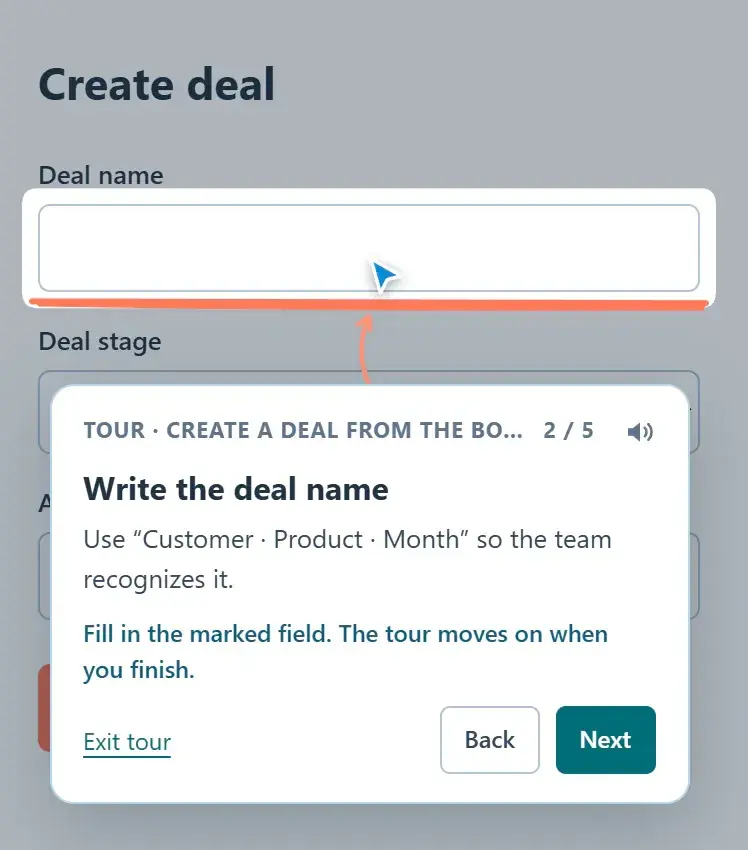
With HubCoach, a Revenue Hub Latam product, an administrator records once how a task is done in HubSpot and every new hire follows it on their own screen. A balloon points at each control, explains what to do and the person does the real action on their record. The tour does not click, type or save for anyone.

  • For new hires
  • For RevOps and administrators
  • In Spanish and English
Guided tour at step 2 of 5: the balloon asks for the deal name and highlights the field in the create form
Guided toursAt a glance
Problem
A week after training, nobody remembers where it is done
Standard
Five or six first-week tasks, recorded in your portal
How to measure
The same task on a real record, without the tour
Limit
Following a tour is not mastering the task
A step-by-step guided tour, with sample data.
The problem

What problem does it solve?

A new hire sits through the HubSpot training, but a week later cannot remember where things are done. It happens every time someone joins a team, in Chile and across Latin America.

  • They cannot remember where to log a call outcome.

  • They do not know how to create a deal from a contact without duplicating it.

  • The CRM administrator answers the same question on chat again.

The standard

What standard does the team agree on?

Choose the five or six tasks a new hire does in their first weeks. For each one, agree on the right way to do it in your portal and who keeps it current when HubSpot changes the screen.

  • Good

    “Create a deal from a contact”, in five steps, recorded in your portal with your real stages.

  • Good

    Each step says what to do and why, and the person does it on their own record.

  • Could be better

    A 20-minute video recorded a year ago, with screens that already changed.

  • Could be better

    One tour for everything, which nobody finishes.

In HubSpot

What does it look like inside HubSpot?

The recorder creates the steps while you do the task; the plan assigns the practice.

Record

You record the task once

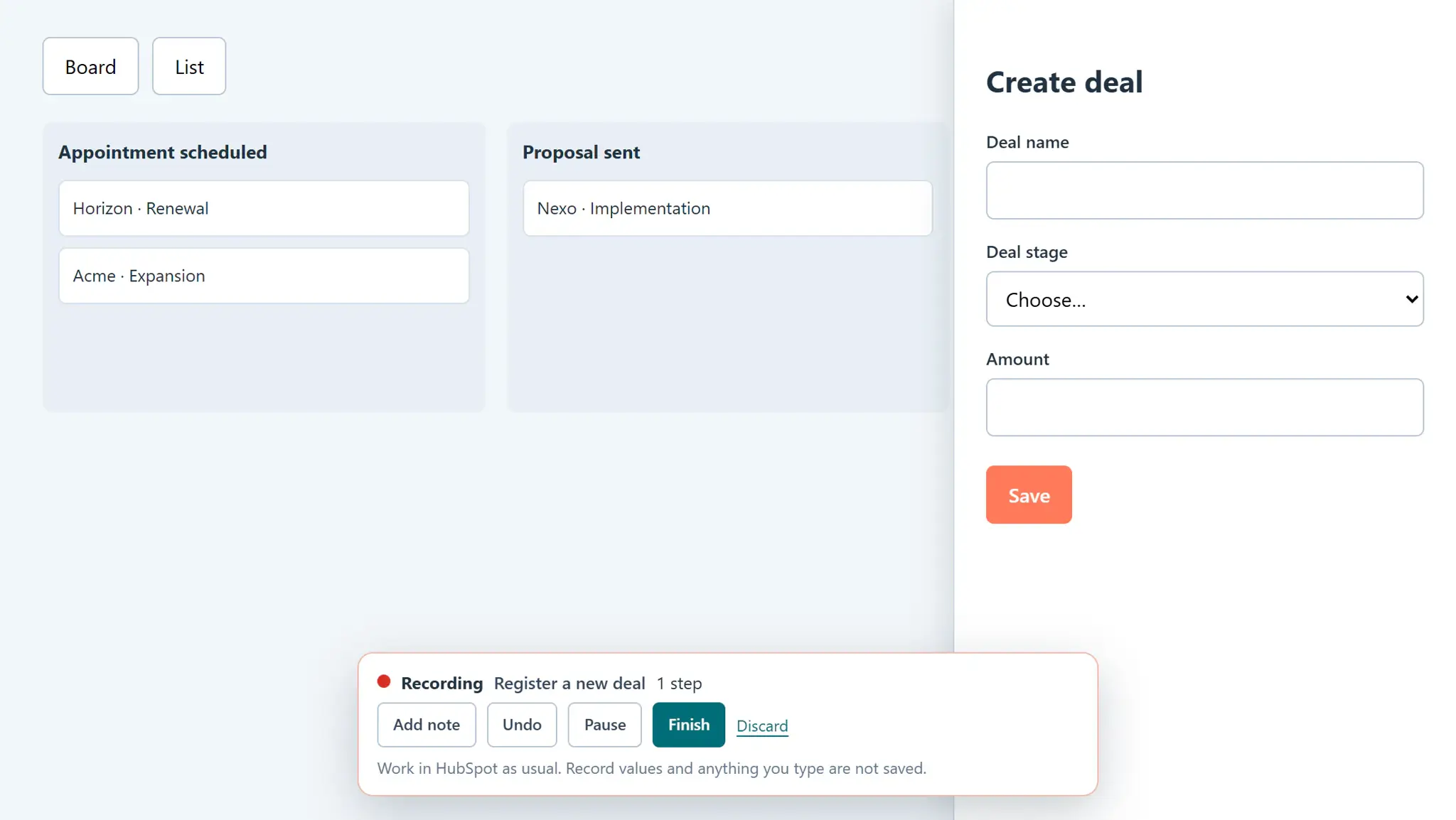
From the Side Panel you choose Tours and Record a tour, and do the task in HubSpot. Each click or completed field becomes a step.

  • Notes explain what has no control.
  • You review it, test it and publish it to whoever you choose.
Record a guided tour and publish it to your team
Recording a tour: the HubCoach bar shows Recording, the tour name and the first recorded step while the person works in the form
Recording a tour with the first step captured, with sample data.
Practice

A practice plan for the first weeks

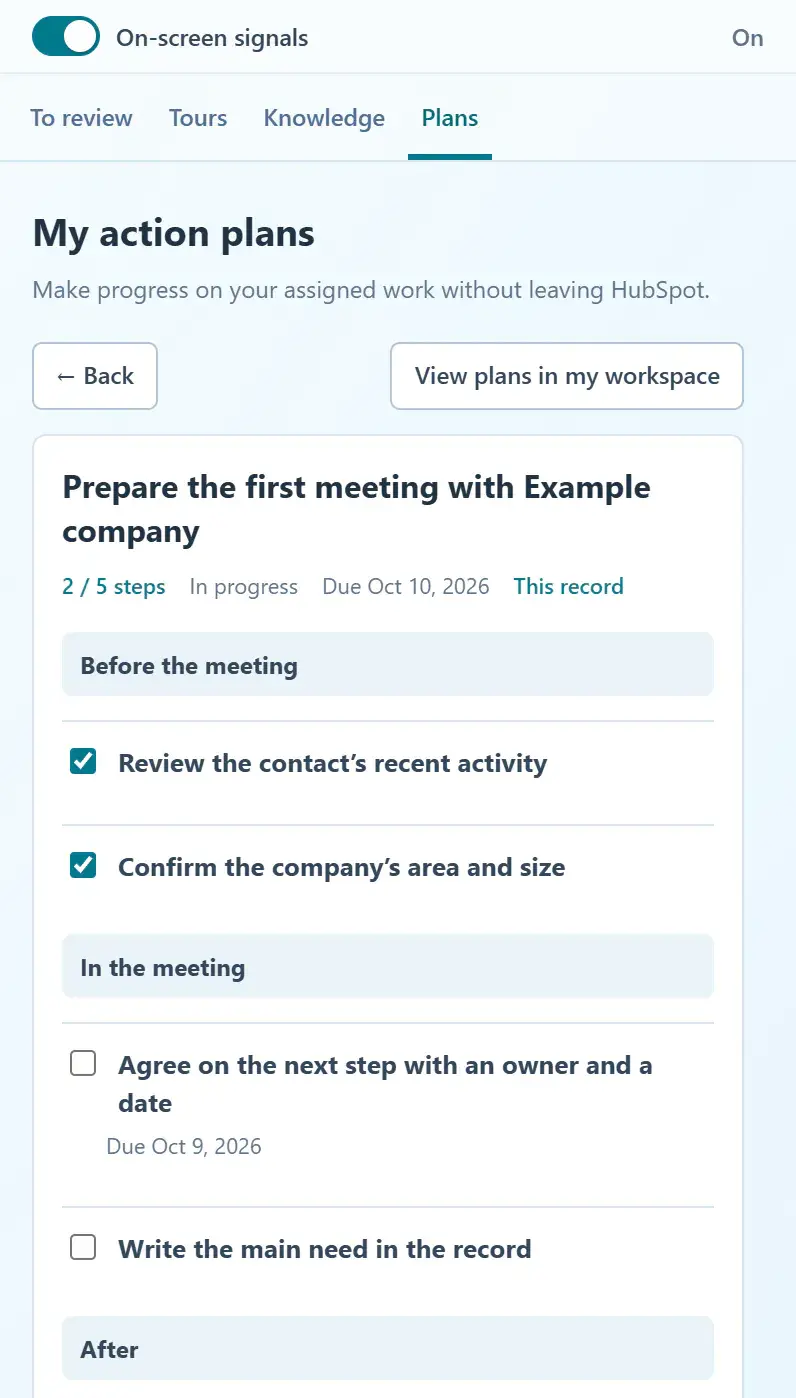
You assign the new hire a plan with the tours to follow and a step to review it with you.

  • They see it in the Side Panel’s Plans tab.
  • Checking a step does not change HubSpot.
Choose a template or a one-time plan
An assigned action plan in the Side Panel: two steps done, the pending next step with its due date and the before, during and after phases of the meeting
A plan assigned to a record, with sample data.
Getting started

How do you put it in place?

Start with the task that generates the most questions.

  1. 01

    Record the tour from the Side Panel

    An administrator or an authorized author chooses Tours, Record a tour, and does the task in HubSpot.

  2. 02

    Review the draft and write each step

    What to do, why and which questions it answers, in Spanish and English.

  3. 03

    Choose the audience, test and publish

    Only the people who need it see it in Tours.

  4. 04

    Assign a practice plan

    The person follows the cursor and does the real action on their own record.

Measuring

How do you know it is working?

After the first weeks, watch the person do the task without the tour.

  • Did they do the task on a real record without help?
  • Which questions do they still ask?
  • Which steps were reported as not found?
Finishing a tour records that it was followed, not that the person masters the task. This is a team review, separate from content analytics.
Limits

What does HubCoach not solve?

A tour shows the way; the person walks it.

  • It does not click, type or save for the person.
  • If HubSpot changes a screen, that step has to be recorded again.
  • It never stores record values or what the person types.
Roles

Who takes part?

A tour is recorded once; keeping it current is a job with an owner.

  • The administrator or an authorized author records and publishes.
  • The new hire follows the tour and reports what they cannot find.
  • The leader reviews the real task in the first weeks.
A person works on a laptop in a technology office.
Keep reading

Which guides and articles help with this use case?

The contextual enablement guide explains when a tour fits and when an article does; the articles show how to record and follow one.

Guides for this use caseHelp articles
A Revenue Hub Latam product

Who is behind HubCoach?

HubCoach is a Revenue Hub Latam product. It grew out of what we solve when we implement and run HubSpot with sales and service teams in Chile and Latin America.

  • Criteria that fade after the training ends.
  • Next steps nobody else can pick up.
  • Handoffs that make the customer repeat their story.
HubSpot Solutions Partner Platinum
HubSpot Platinum Partner in Santiago, ChileWe implement, rescue and run HubSpot for B2B companies.
HubSpot Partner Summit LATAM 2026From the Revenue Hub Latam team that created PortalSync: most-voted pitch, Pitch Contest · HubSpot Partner Summit LATAM 2026, Bogotá.
Frequently asked questions

What do teams ask before using HubCoach?

Does a guided tour store customer data?

No. A tour stores the HubSpot view without identifiers, the control and your text. It never stores record values or what the person types.

Who can create guided tours?

Administrators, and the people an administrator allows to create tours. Each author manages the tours they created; administrators manage all of them.

What happens if HubSpot changes a screen?

The tour shows that it did not find an element. Record that step again; usage analytics show which steps need it.

Can the person leave the tour halfway?

Yes. They can leave at any time and start again from the Tours tab. What they already did in HubSpot stays as they saved it.

Which tasks should we record first?

The ones a new hire does in their first weeks and asks about most: logging a call, creating a deal from a contact or closing a ticket with its resolution.

Are tours available in Spanish?

They are written in Spanish and English, and the person sees the language they chose. We built them with teams in Chile and Latin America in mind.

Waitlist

How do I apply to the waitlist?

Current seats are full. Tell us about your team, in Chile or elsewhere in Latin America, and what you would like it to do better in HubSpot.

  1. You apply with your work email and how many people would use it.
  2. We review the list every 15 days and write to you when there is a seat.
  3. You start with a small group and one concrete process.
Guided tours in HubSpot with HubCoach | Revenue Hub Latam