


Data quality

Duplicate contacts in HubSpot: how to find them and decide what to merge in Chile and Latin America

HubSpot already prevents many duplicates: it deduplicates contacts by email address and companies by domain. Duplicates still appear when the same person uses two emails, when companies have no domain, or when imports and integrations create records from several sources. To find them, use the native duplicates tool and review each pair before merging, because merged records cannot be reverted. This guide explains how to decide what to merge and how to stop new duplicates, for teams in Chile and Latin America.

  • By Roberto Guerra
  • 3 min read
  • Updated October 4, 2026
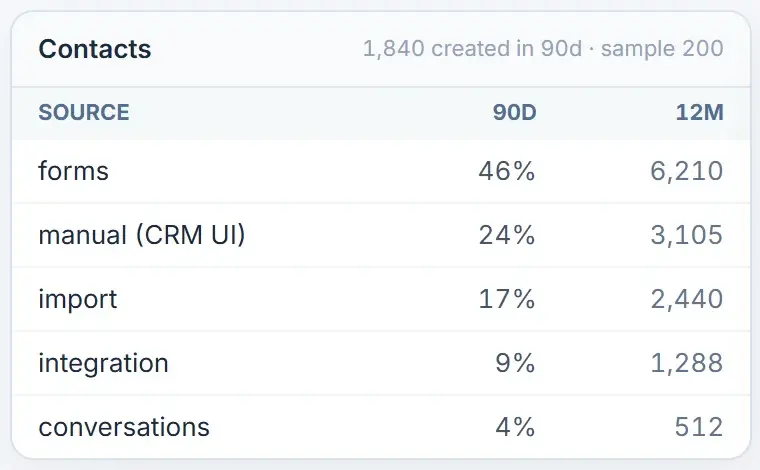
Who creates the portal's contacts: forms, users, imports, integrations and conversations, with their share.
In short
HubSpot deduplicates
Contacts by email, companies by domain
Native tool
Manage duplicates (Professional or Enterprise)
Before merging
Owner, stage, associations and consent
A merge
Cannot be reverted
Contact sources in HubSpot Audit, with sample data.

How does HubSpot prevent duplicates by default?

According to HubSpot deduplication documentation, contacts are deduplicated by email address and companies by company domain name.

A form submission or an import with an existing email updates that contact instead of creating a new one.

Why do duplicates still appear?

  • The same person writes from a personal and a work email.
  • Companies were created without a domain, so HubSpot has nothing to match on.
  • The ERP and the forms create the same company under its legal name and its trading name.
  • Reps create records by hand before searching for them.

How do you find duplicates with HubSpot tools?

The duplicates management tool suggests pairs of contacts and companies. It requires a Professional or Enterprise subscription.

For contacts it compares first name, last name, email, phone, IP country, zip code and company; for companies, domain, name, country, phone and industry.
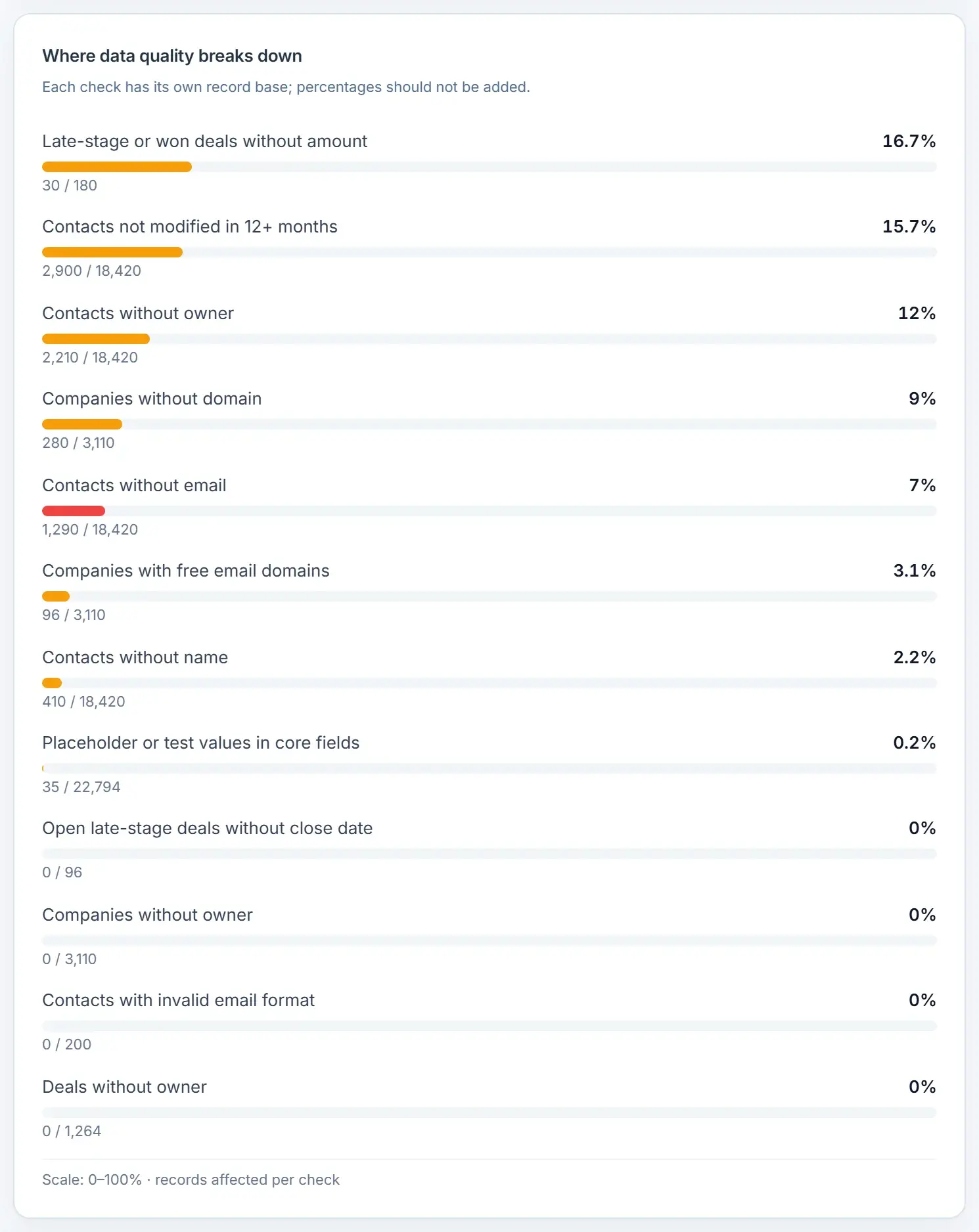
Data quality checks with the share of records affected by each one, such as companies without a domain or contacts without an owner.
Data quality in HubSpot Audit, with sample data.

How do you decide what to merge?

  • Owner: if each record has a different owner, agree who keeps the relationship first.
  • Lifecycle stage and open deals: a merge can move a customer back or join two buying processes.
  • Associations: confirm it is the same person or company, not two branches or subsidiaries.
  • Subscriptions and consent: keep the most restrictive communication preference.

When in doubt, do not merge. Mark the pair for review with its owner and document the rule you used.

How do you prevent new duplicates?

  1. Give every company a domainIncluding the ones created by integrations.
  2. Choose one source of creation per objectIf your ERP and your forms both create companies, define which one wins.
  3. Import with a unique identifierEmail, domain or record ID, so imports update instead of creating.
  4. Search before creatingAnd show why it matters inside the record, not in a manual nobody reads.

What can HubSpot Audit measure, and what does it not do?

HubSpot Audit measures the conditions that create duplicates: companies without a domain, contacts without email, placeholder names and how many sources create each object.
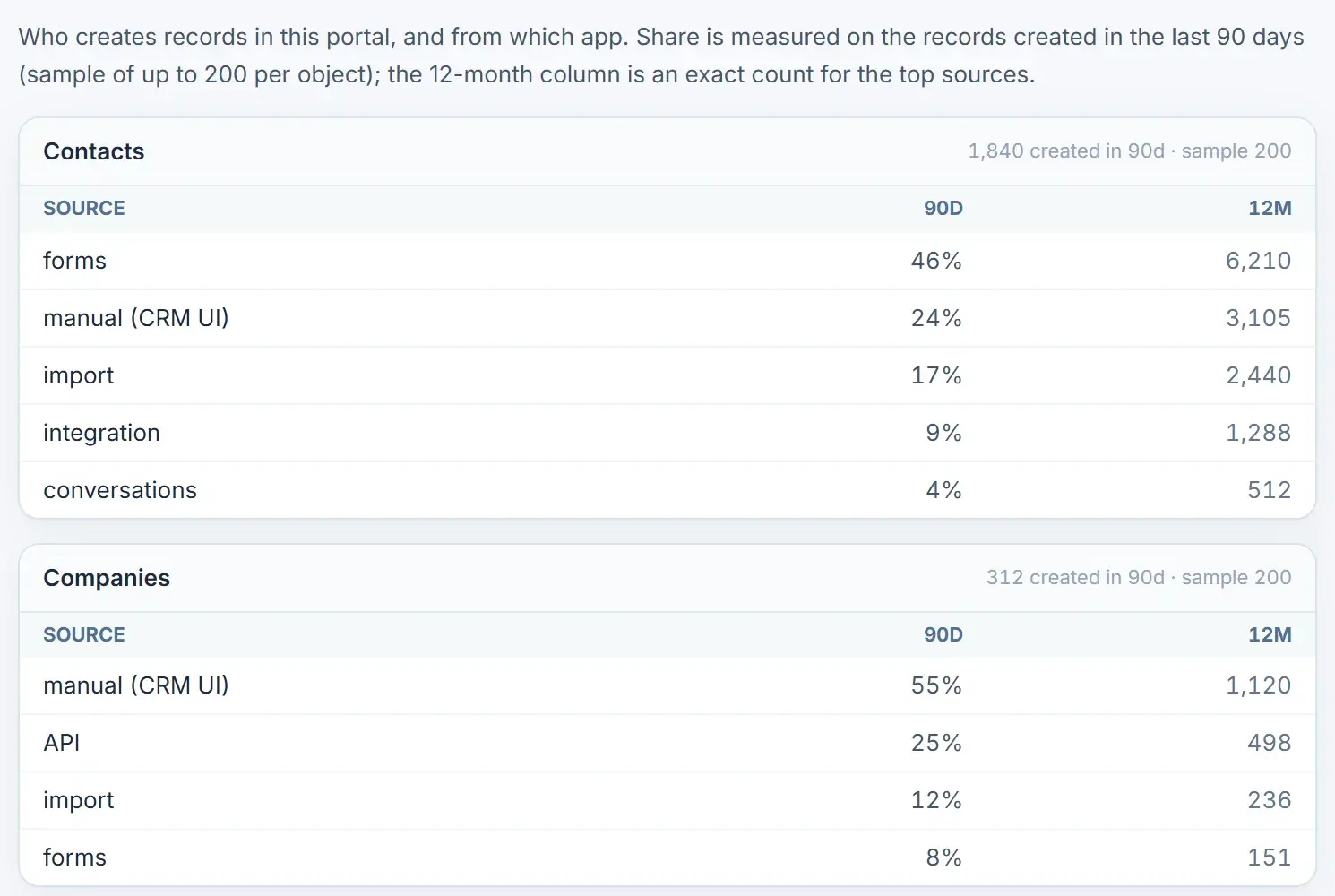
Who creates the portal's contacts and companies: forms, users, imports, API and integrations, with their 90-day share and the 12-month count.
Record sources in HubSpot Audit, with sample data.

HubSpot Audit does not merge records: merging stays in HubSpot, with your team's judgment. For the broader picture, see the seven data quality problems.

FAQ

What else do people ask?

Does HubSpot detect duplicate contacts automatically?

It prevents duplicates with the same email address and companies with the same domain. For similar but not identical records, use the duplicates management tool, available with Professional or Enterprise subscriptions.

Can I undo a merge in HubSpot?

No. HubSpot states that merged records cannot be reverted. Review owner, stage, deals and associations before merging.

Why do I have duplicate companies?

Usually because companies were created without a domain, or because several integrations create companies with different names for the same organization, as often happens in Chile and Latin America with legal and trading names.

Should I merge two contacts with different owners?

Not before the owners agree who keeps the relationship. Merging first and asking later usually ends in a lost deal or an angry rep.

Does HubSpot Audit merge duplicates?

No. It measures the conditions that create duplicates and shows where they come from. Your team does the merging in HubSpot, with the native tool.

How do I stop imports from creating duplicates?

Import with a unique identifier such as email, domain or record ID, so HubSpot updates existing records instead of creating new ones.

Next steps

What should you do after reading this guide?

More HubSpot Audit guidesFrom Revenue Hub Latam
A Revenue Hub Latam product

Who is behind HubSpot Audit?

HubSpot Audit is a Revenue Hub Latam product. It grew out of the reviews we did by hand in every HubSpot diagnostic with B2B companies in Chile and Latin America.

  • Tools born from real problems we solved with clients in HubSpot.
  • HubSpot Audit diagnoses the portal; HubCoach, Teamwork and PortalSync support the day to day.
  • If you want to review the result with our team, we do it in a HubSpot diagnostic.
HubSpot Solutions Partner Platinum
HubSpot Platinum Partner in Santiago, ChileWe implement, rescue and run HubSpot for B2B companies.
HubSpot Partner Summit LATAM 2026From the Revenue Hub Latam team that created PortalSync: most-voted pitch, Pitch Contest · HubSpot Partner Summit LATAM 2026, Bogotá.
Start on your own, for free

Want to see this in your portal?

Connect HubSpot with OAuth and see your findings in minutes, with the free HubSpot Audit. For now, connecting requires a portal with an Enterprise product, Service Hub Professional or higher, and Marketing Hub or Content Hub Professional or higher.

  1. Create your account with your work email.
  2. Connect your HubSpot portal with OAuth.
  3. Read the summary and decide the next step.
Duplicate contacts in HubSpot | Revenue Hub Latam