
Before you audit

HubSpot portal audit checklist 2026 for B2B companies in Chile and Latin America

A HubSpot audit checks whether your portal reflects how your company really sells. This checklist organizes the review into six pillars: data model, process and pipelines, adoption, automation, governance and marketing. For each pillar you get what to look at, which signal points to a problem and which decision to make before you touch anything. It is written for B2B teams in Chile and Latin America that want to trust their reports before a quarter close, a partner change or an AI project.

  • By Roberto Guerra
  • 5 min read
  • Updated October 4, 2026
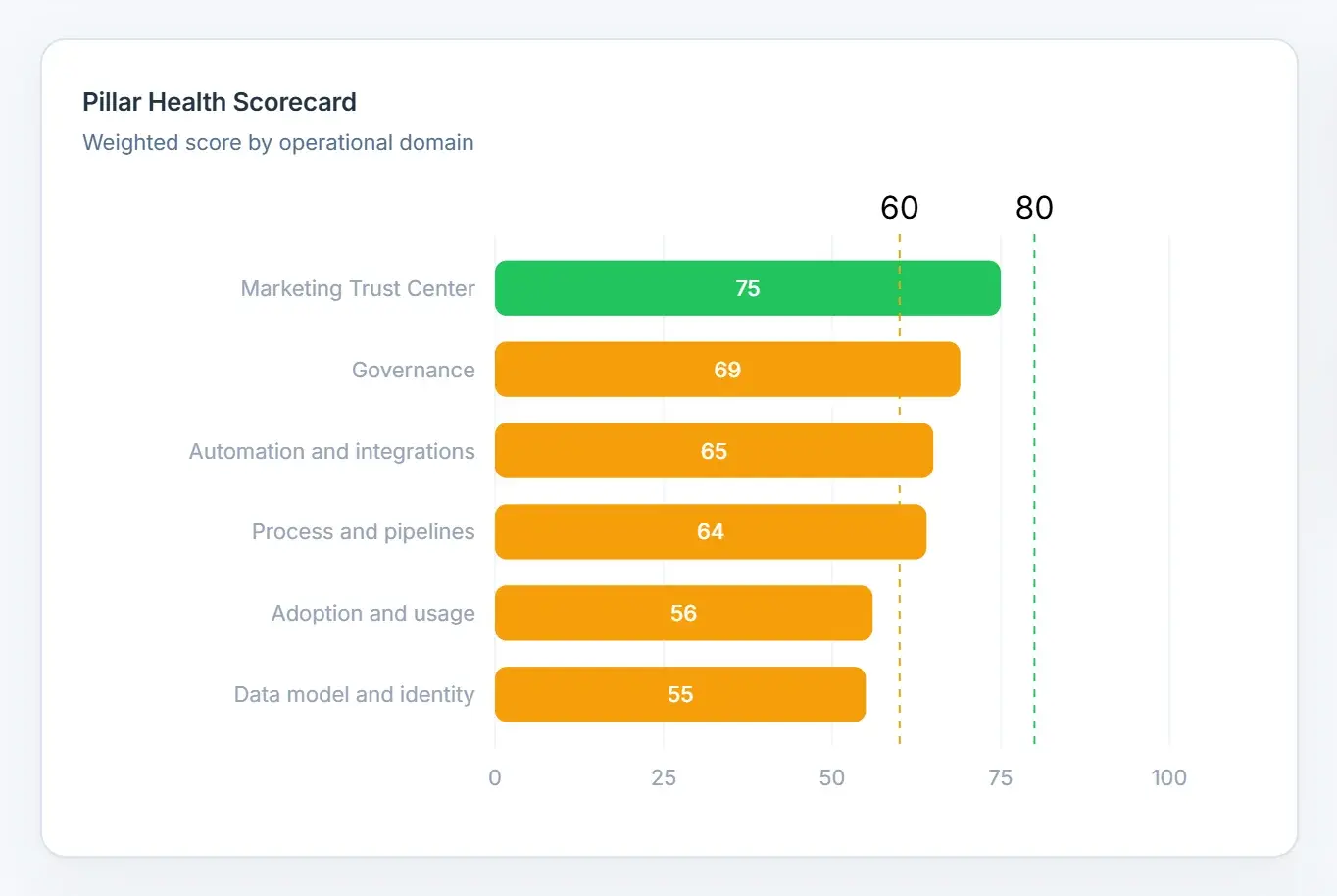
Bar chart with the weighted score of each of the six portal pillars.
In short
For
RevOps, admins and sales leadership
What it covers
Six pillars, from data to marketing
How often
Every quarter
Golden rule
Phase out before you archive
Follow it by hand or with HubSpot Audit.
HubSpot Audit pillar scorecard, with sample data.

Why audit HubSpot every quarter instead of once a year?

Portals drift a little every week. A new rep creates a property, a campaign leaves lists behind, an integration starts creating records from a new source.

None of that throws an error, so nobody notices until a forecast or a board report does not add up. A quarterly review keeps the drift small enough to fix in hours instead of months.

What should you review in the data model and identity?

  • Unused and duplicated properties: two properties storing the same thing split reporting in two.
  • Missing descriptions: nobody can maintain them once their creator leaves.
  • Core fields: contacts without email or name, companies without domain, records without owner.
  • Placeholder values: “test”, “N/A” or “asdf” usually come from a field required at creation.
  • Associations: contacts without a company and deals without contacts break account views.
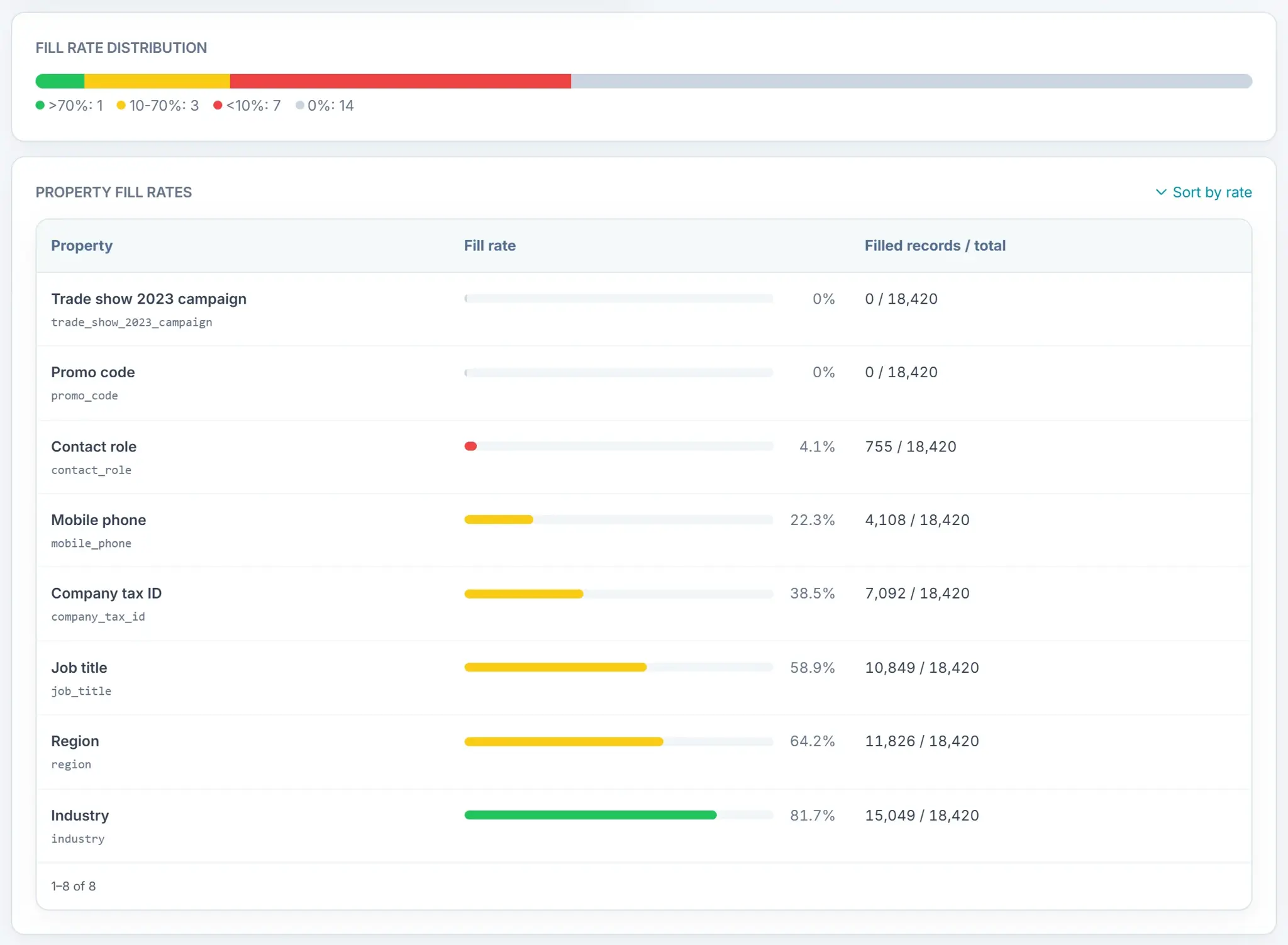
Contact property fill rates, from empty properties to ones filled in most records.
Property fill rates in HubSpot Audit, with sample data.

What should you review in process and pipelines?

  • Open deals whose close date is already in the past.
  • Lost deals without a lost reason, or a lost reason stored as free text you cannot report on.
  • Post-sale stages inside the sales pipeline, and stages named like tasks (“waiting for reply”).
  • Pipelines without clear won and lost stages.
  • Lifecycle stages that contradict the deal stage of the same account.

How do you measure adoption and usage without asking anyone?

This is the pillar a sales manager cares about most, because it shows whether the pipeline is managed or just stored.

  • Open deals with no next activity scheduled.
  • Deals stuck 30 days or more in the same stage, counted from the day they entered it.
  • Deals in advanced stages with no activity at all.
  • Conversations without a reply, and response times by inbox and owner.
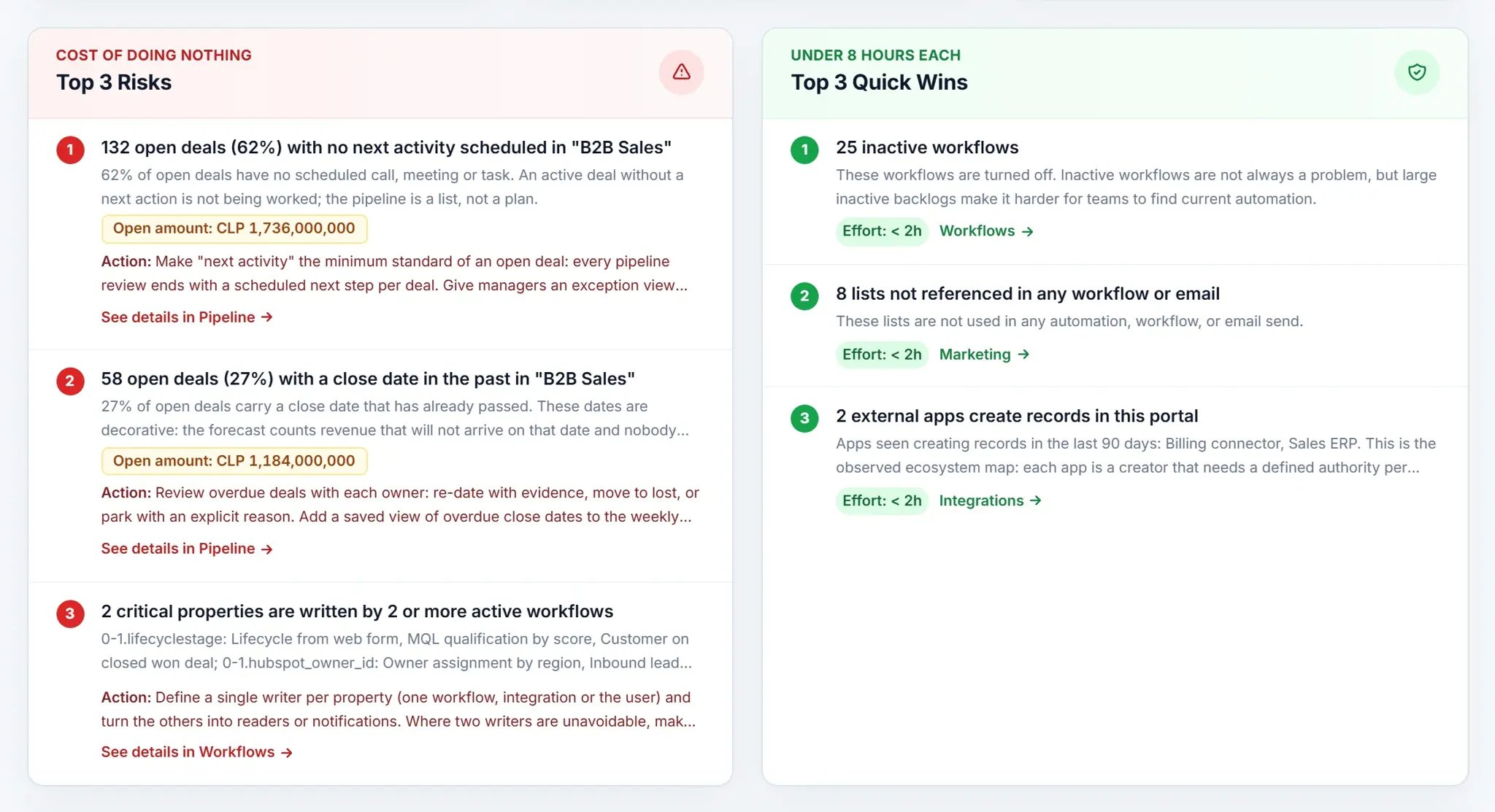
The top three risks with their open amount and suggested action, next to three quick wins of under 8 hours each.
HubSpot Audit risks and quick wins, with sample data.

What should you review in automation and integrations?

  • Workflows with recurring errors and active workflows nobody enrolls in anymore.
  • Two or more workflows writing the same property: the last one to run wins.
  • Workflows that move stages or close deals on their own.
  • Which apps, imports and integrations create your records, and whether one object has too many sources.

The workflow audit guide covers this pillar step by step.

What should you review in governance?

  • Users with no recent activity who still hold a paid seat.
  • How many super admins the portal has and whether each one needs that access.
  • Records owned by deactivated users.

When does marketing count in the audit?

Unused lists and forms without submissions are reviewed in every portal. Marketing emails, with their bounces and old drafts, need Marketing Hub or Content Hub Professional or Enterprise.

But they only weigh in the score when the portal sent marketing email in the last 90 days. A sales-only portal does not lose points for an email tool it does not use.

What do you do with what you find?

Do not start by deleting. Give every asset one decision and work in this order:

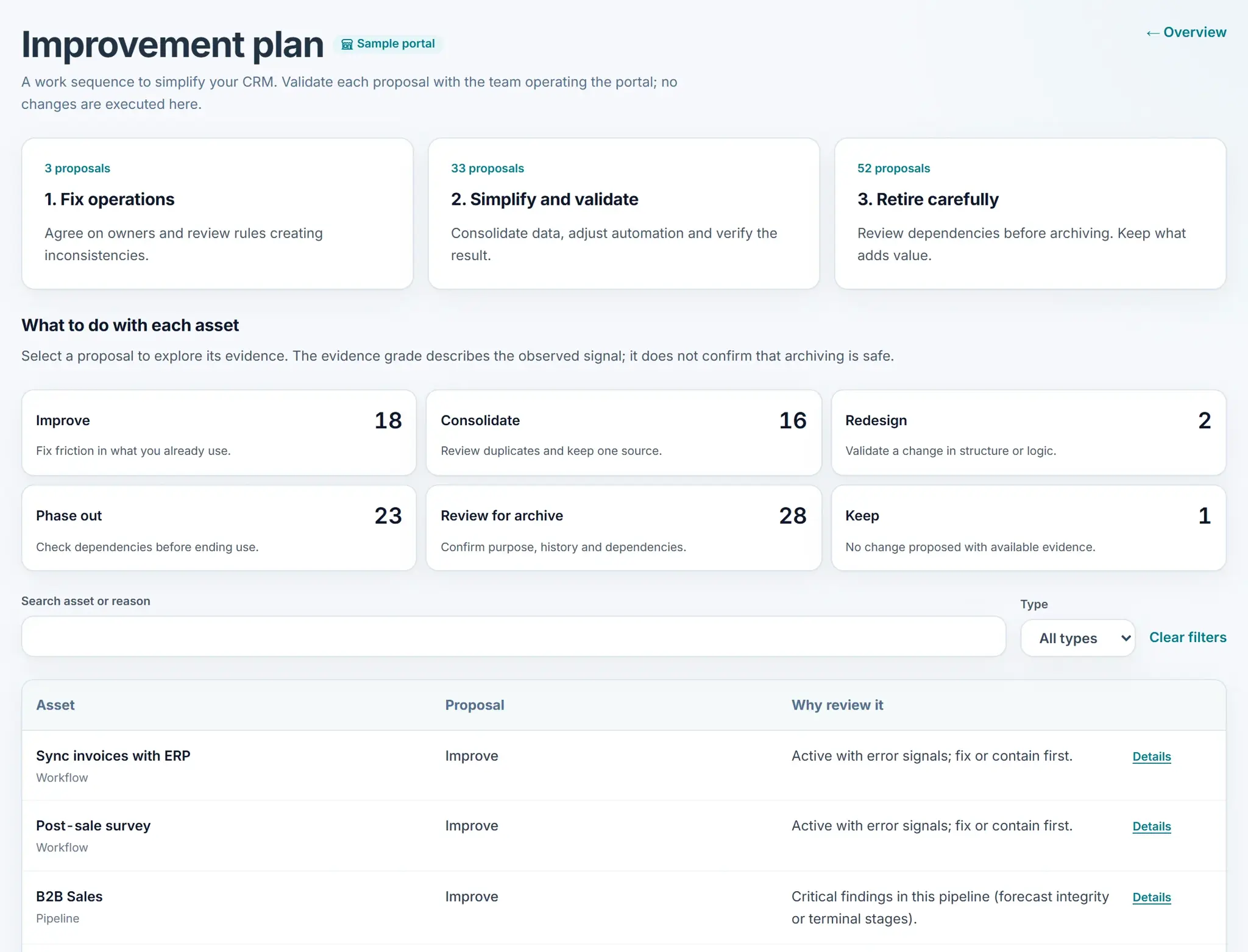
Possible decisions for each audited asset
DecisionWhen to use it
KeepIt is used and documented.
ImproveIt is useful but incomplete: no description or the wrong type.
ConsolidateTwo assets do the same job. Confirm the processes really are the same first.
RedesignIt should become a native feature or a better structure.
Phase outHide it from forms and views, document why and wait.
Review for archiveArchive it only after confirming nothing depends on it.
Improvement plan with three work phases and one proposal per asset: improve, consolidate, redesign, phase out, review for archive or keep.
HubSpot Audit improvement plan, with sample data.

The improvement plan does not recommend deleting: it proposes keep, improve, consolidate, redesign, phase out or review for archive.

How is the Portal Health Score calculated?

Weight of each pillar in the Portal Health Score
PillarWeight
Data model and identity30
Process and pipelines30
Adoption and usage20
Automation and integrations12
Governance8
Marketing Trust Center0 or 8

An automated audit reads configuration and records through the HubSpot API. It measures how healthy your assets are, not whether the portal matches the way your team sells.

That second question needs conversations with the team, which is what a HubSpot diagnostic adds.

FAQ

What else do people ask?

What is a HubSpot portal audit?

It is a structured review of how your HubSpot portal is configured and used: data model, pipelines, adoption, automation, governance and marketing. The goal is to know whether you can trust the reports and what to fix first.

How often should I audit HubSpot?

Every quarter is a good rhythm for most B2B teams in Chile and Latin America, plus before a partner change, a migration, a new integration or an AI project that depends on CRM data.

Which pillar matters most?

Data model and process weigh 30 each because every report depends on them. Adoption, at 20, is the one that tells a manager whether the pipeline is actually being worked.

Should I delete unused properties after the audit?

No. Phase them out first: hide them from forms and views, document the decision and confirm nothing depends on them. Archive only after that check.

Does an automated audit replace a consultant?

It replaces the manual counting, not the conversation. The tool measures asset health; a diagnostic with the team checks whether the portal reflects how you sell.

Does the audit change data in HubSpot?

The audit only reads your portal. Paid actions do change HubSpot: the ones that turn on, turn off, archive, delete or remove users ask for confirmation in a dialog, and assigning an owner applies as soon as you pick the person.

Next steps

What should you do after reading this guide?

More HubSpot Audit guidesFrom Revenue Hub Latam
A Revenue Hub Latam product

Who is behind HubSpot Audit?

HubSpot Audit is a Revenue Hub Latam product. It grew out of the reviews we did by hand in every HubSpot diagnostic with B2B companies in Chile and Latin America.

  • Tools born from real problems we solved with clients in HubSpot.
  • HubSpot Audit diagnoses the portal; HubCoach, Teamwork and PortalSync support the day to day.
  • If you want to review the result with our team, we do it in a HubSpot diagnostic.
HubSpot Solutions Partner Platinum
HubSpot Platinum Partner in Santiago, ChileWe implement, rescue and run HubSpot for B2B companies.
HubSpot Partner Summit LATAM 2026From the Revenue Hub Latam team that created PortalSync: most-voted pitch, Pitch Contest · HubSpot Partner Summit LATAM 2026, Bogotá.
Start on your own, for free

Want to see this in your portal?

Connect HubSpot with OAuth and see your findings in minutes, with the free HubSpot Audit. For now, connecting requires a portal with an Enterprise product, Service Hub Professional or higher, and Marketing Hub or Content Hub Professional or higher.

  1. Create your account with your work email.
  2. Connect your HubSpot portal with OAuth.
  3. Read the summary and decide the next step.
HubSpot portal audit checklist for 2026 | Revenue Hub Latam